Troubleshooting: Difference between revisions
m Protected "Troubleshooting" ([Edit=Allow only administrators] (indefinite) [Move=Allow only administrators] (indefinite)) |
|||
| Line 115: | Line 115: | ||
</div> | </div> | ||
<div> | <div> | ||
If you're having issues related to D3DX9, follow | If you're having issues related to D3DX9, follow this step: | ||
</div> | </div> | ||
</div> | </div> | ||
Revision as of 22:38, 13 November 2025
🛠️ Troubleshooting Guide
🚀 Quick Fix Checklist
🔐 Login Issues
• Check Game Account exists
• Verify password
• Check server status
🚫 Crash on Launch
• Install VC++ Redist
• Run as Admin
• Update drivers
🛡️ Gepard Issues
• Antivirus exceptions
• Fresh client install
• Clean extraction
🛡️ D3DX9 Error
• Check Missing DLL's
• Fresh client install
• Clean extraction
🌐 Connection
• Check firewall
• Internet connection
• Server maintenance
🔐 Unable to Log In
Before anything else, check your account setup:
| 👤 | You must create a Game Account in addition to your Master Account |
| ⚠️ | The Master Account alone is not sufficient for logging into the game |
| 🌐 | Create Game Account via: website |
• Master Account = Website login
• Game Account = In-game login
• You need BOTH to play!
🚫 Game Closes Immediately After Launch
This is typically caused by missing system components required by the game.
Microsoft Visual C++ Redistributables (2005–2012)
All-in-One redistributable pack:
→ Download from GitHub
After installation, restart your computer and try launching the game again.
🛡️ D3DX9 Error
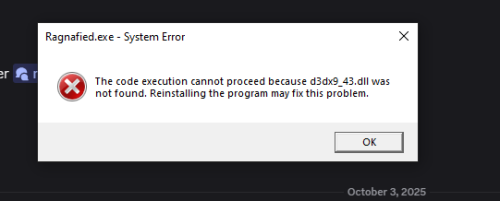

If you're having issues related to D3DX9, follow this step:
| 🛡️ | Follow the instruction in this link: https://learn.microsoft.com/en-us/answers/questions/2753248/missing-d3dx9-43-dll |
🛡️ Gepard Crash or Game Not Starting
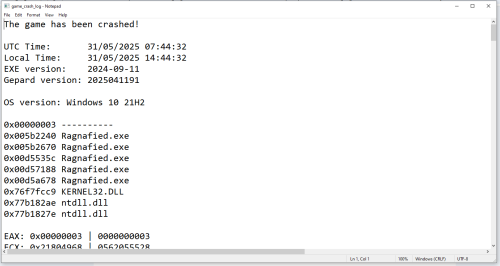

If you're having issues related to Gepard (e.g., the game won't start or closes silently), follow these steps:
| 🛡️ | Add exception in your antivirus or Windows Defender for the game folder |
| 🗑️ | Delete the current game folder |
| 📁 | Re-extract the game client into a new folder (not the old one) |
| 🎮 | Launch the game and log in again |
This resolves most cases where security software interferes with the game files.
1. Add game folder to antivirus exceptions
2. Delete old game folder completely
3. Extract fresh client to new location
4. Run as Administrator if needed
📩 Need More Help?
If the issue persists, we recommend reaching out through official support channels:
| 💬 | Contact us in the Discord |
| 📋 | Check community forums for similar reports |
| ✅ | Ensure all steps above were followed completely |
| 🔍 | Search existing solutions in our knowledge base |